

March 2026 Product Updates

This month’s updates are focused on giving you more precision and control over your store's experience. From "set it and forget it" merchandising to advanced tools for personalizing the customer journey, here is what’s new across the Dutchie platform for March.
Stay up to date and ahead of the curve with all of Dutchie's product updates and system enhancements by subscribing to our Product Release Notes.
What's New
Smart Tags
Automate your merchandising with a "set it and forget it" rules engine. Automatically tag your inventory based on lab results, pricing trends, or expiration dates, instantly triggering the right discounts and menu collections without any manual work.
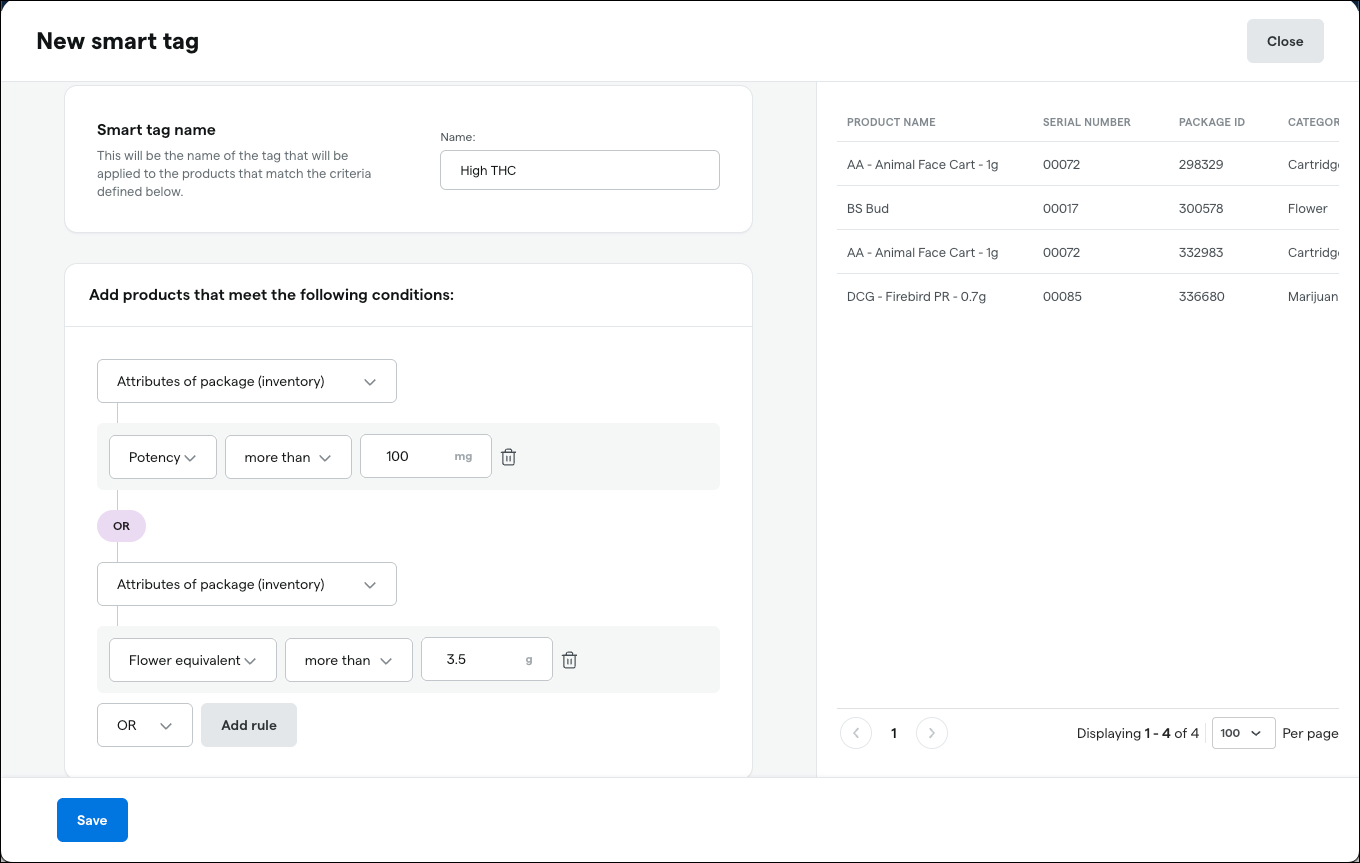
Ready to automate with Smart Tags? Log in to Dutchie back office and head over to the Inventory tab. From there, select Smart Tags to start building your "set it and forget it" rules. Whether you’re tagging by lab results or expiration dates, you can have your first automation running in minutes.
Brand Portal V2
Brands can now create and manage product catalogs with verified images, descriptions, and other product information that can be distributed across the Dutchie network. This ensures consistent brand identity and accurate product information. Retail operators still have the ultimate control over what will appear on their menus. See Brand Portal V2 in action, below.
Click here to refer your favorite brands today & start connecting.
Exclusive Channel Offers
Drive app downloads and specific shopping behaviors by offering "Mobile-Only" or "Kiosk-Only" promotions. This feature uses segment-specific logic to show unique discounts only on the platforms you choose.
Ready to drive targeted traffic? Log in to your Dutchie back office and navigate to Marketing > Discounts. Once there, click Create Discount and head to the Details section. Under Order Sources, simply select the specific platforms like Kiosk or Mobile App where you want your exclusive offer to appear. It’s a powerful way to reward app users or streamline your in-store flow with kiosk-only deals.
Want to learn more? Go to Discounts in Dutchie's Admin Help Center to view step-by-step instructions.
(IRL Events) Event-Based Lead Generation
Turn pop-ups and festivals into revenue you can track. Use unique QR codes to sign customers up for rewards instantly and track exactly how much long-term revenue each specific event generated for your brand.
Ready to track your event ROI? Log in to your Dutchie back office and navigate to Marketing > Events. From there, click Create Event to set up your specific pop-up or festival. Once your event is live, you can generate a unique QR code for your signage that automatically signs customers up for your rewards program and tracks their long-term spend back to that exact day.
Want to learn more? Go to Events in Dutchie's Admin Help Center to view step-by-step instructions.
Additional Updates
Segments, Growth, and Retention
Comms Preferences
Give your customers (and budtenders) control. Users can now easily manage their own opt-in statuses and preferences, ensuring your marketing remains compliant and reduces "unsubscribe" rates.
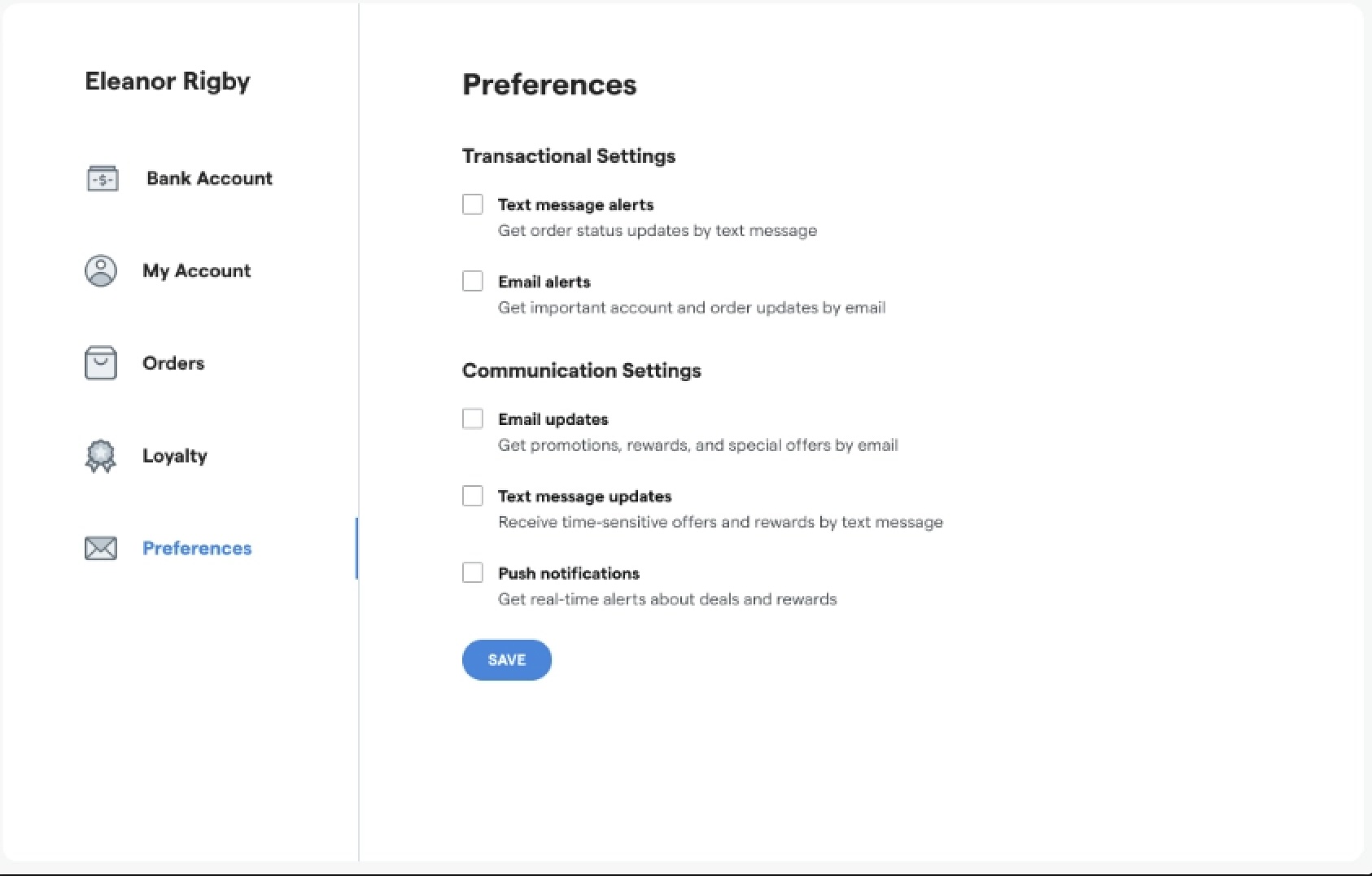
Ready to boost your compliance and retention? You can now manage communication preferences directly at the point of sale. In the Dutchie Register, budtenders can simply pull up a customer profile and select the Preferences tab to toggle SMS, Email, or Push notifications on or off. By giving customers control over how they hear from you, you'll ensure your marketing remains compliant while reducing unsubscribe rates.
Want to learn more? Go to Customer Search in Dutchie's Admin Help Center to View step-by-step instructions.
Enhanced Segment Attributes
Build audiences based on what actually drives your customers and target campaigns with even greater precision. A major expansion of segment attributes gives you 30+ new ways to filter and reach customers, spanning loyalty status and spend behavior, purchase patterns, preferred channels and devices, location habits, campaign engagement history, and more, so every message is tailored to how your customers actually shop and engage with your stores.
Ready to sharpen your targeting? Log in to your Dutchie back office and navigate to Customers > Segments. Click Create Segment (or edit an existing one) and select Add Rule. You’ll now find powerful new filters under Attributes and Activity, including Loyalty Opt-In Source, Has Phone Number, and Total Locations Shopped. These new attributes allow you to move beyond basic lists and build high-precision audiences for your next SMS or email campaign.
Want to learn more? Go to Segments in Dutchie's Admin Help Center to view step-by-step instructions.
Custom Segment Badges at the Register
Tailor every in-store conversation by visually flagging your most important shoppers directly at the register. Budtenders can instantly identify VIPs, medical patients, or high-value customers through customizable icons and colors. By prioritizing these badges, you ensure the most impactful insights are front and center, allowing your team to personalize the experience on the spot.

Ready to personalize every checkout? Log in to your Dutchie back office and navigate to Customers > Segments. From here, you can activate pre-configured segments (like "Big Spender" or "Dormant Shopper") or click Create Segment to build your own based on specific shopping behaviors. Once active, these badges will automatically appear in the Customer Insights section of the register, giving your budtenders the instant context they need to tailor every conversation.
Want to learn more? Go to Segments in Dutchie's Admin Help Center to view step-by-step instructions.
Employee Rewards & Guardrails
Boost staff retention and morale by creating incentive programs specifically for your budtenders. Build dedicated employee segments to offer exclusive rewards or set restrictions that prevent double-dipping on existing discounts. It is a simple way to reward your team while maintaining full control over store margins.
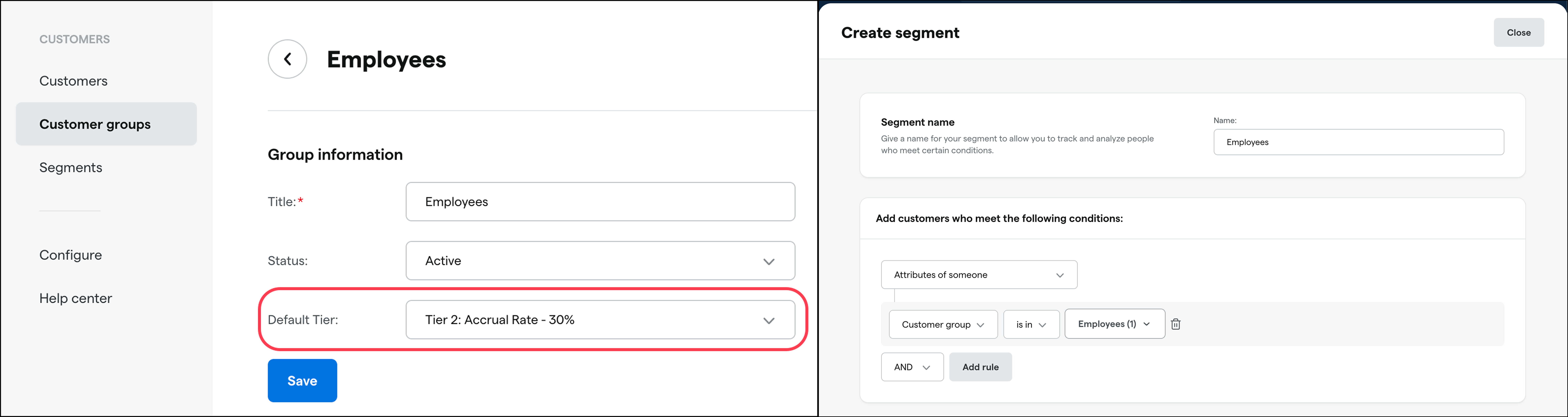
Ready to reward your team? Log in to your Dutchie Backoffice and navigate to Marketing > Loyalty > Settings. From here, you can toggle Employee Participation to decide exactly how your staff interacts with your rewards program. Use this section to set specific guardrails—like preventing employees from stacking their staff discount with loyalty points or to create dedicated segments that ensure your team gets the exclusive perks they deserve without impacting your margins.
There’s multiple ways to restrict or setup guardrails for your loyalty programs. Check out the article below for more details. Want to learn more? Go to Dutchie back office in Dutchie's Admin Help Center to view step-by-step instructions.
E-Commerce & Mobile App
Multi-Image Product Cards
Give shoppers more confidence to buy without leaving the page. Customers can now scroll through a product's full gallery (labels, bud shots, and packaging) directly from the main menu, reducing "click-back" fatigue.
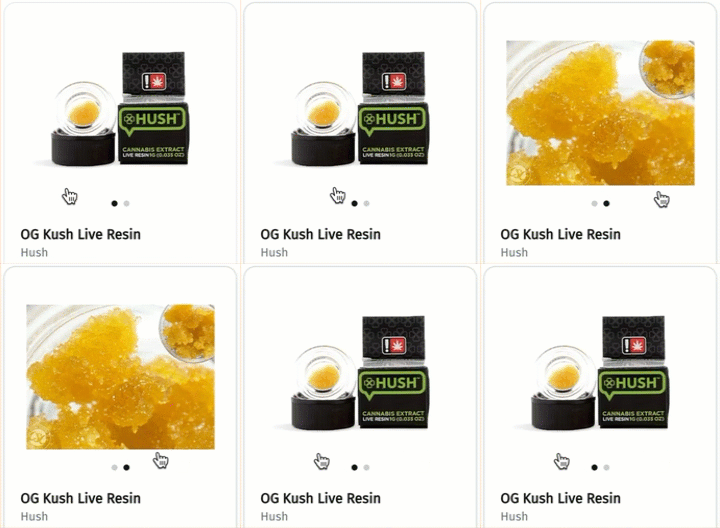
Ready to upgrade your menu's look? Head to the Edit Menu Item screen for any product in Dutchie Admin and click the "+" icon to upload additional PNG or JPEG files. The first photo you upload acts as the lead image for your menu’s card and list views, while the rest create a seamless gallery for shoppers.
Pro Tip: If you use the Dutchie Content Library, those photos will automatically become your lead images, with your custom uploads serving as additive gallery views.
Custom Mobile Menu
Take full control of your mobile journey with our new drag-and-drop Custom Menu builder. You can now move beyond standard menus to highlight top brands, link directly to your loyalty program, or create nested sections in real-time. By putting your most important content front and center, you simplify the path to purchase and keep shoppers engaged with what matters most to your business. See Custom Mobile Menu in action, click through our demo below.
Ready to customize your app’s journey? Log in to Dutchie E-Comm admin and navigate to Customize>Mobile App Navigation. From here, you can use the intuitive drag-and-drop tool to rearrange your menu, highlight top-performing brands, or link directly to your loyalty program. Whether you're nesting sections for a cleaner look or putting a seasonal collection front and center, your changes will update in real-time to create a shopping experience that is uniquely yours.
From bottlenecks to breakthroughs: Dutchie’s database migration journey, an AWS case study
We partnered with Amazon Web Services to rebuild the core database infrastructure behind every Dutchie transaction, delivering faster checkouts, smoother cart updates, and a platform that automatically scales when traffic spikes. We make sure your system keeps up so your team can stay focused on customers, not technology. Read the full story on the AWS Blog.
"Dutchie has built a reliable, scalable platform on AWS, and is running business-critical workloads on Amazon RDS for SQL Server. We've been impressed by their team's ability to leverage AWS services effectively to serve their customers, and we look forward to continuing to support their innovation.”
- Mehul Y. Shah, Director for Amazon RDS for SQL Server, Oracle, Db2, and Oracle Database@AWS
Ready to see how these new features can drive growth? Schedule time with your account manager to activate them.
Related articles